tha lore
after an extremely hectic and (too much, even for me) eventful december with some insane ups and downs, i came back from my THIRD back to back trip right after finishing final exams. i was still working, still working out, still juggling my schedule and flights, just nonstop motion. new years lowk ended on a terrible note for me, i was fr crushed n out of it.
so a little after, me n my homies pulled up to downtown mountain view just to hang out, get food, chill. no big plans, just vibes. they had me feeling all UP again fr, we were talking, chilling, laughing, saying fuck all tha things and people that bring us down. in that moment it was like all the chaos of december + new years faded out, and it was just me n my homies, good energy only, reminding me i’m still here, still up, still me. 💯
tha shoot
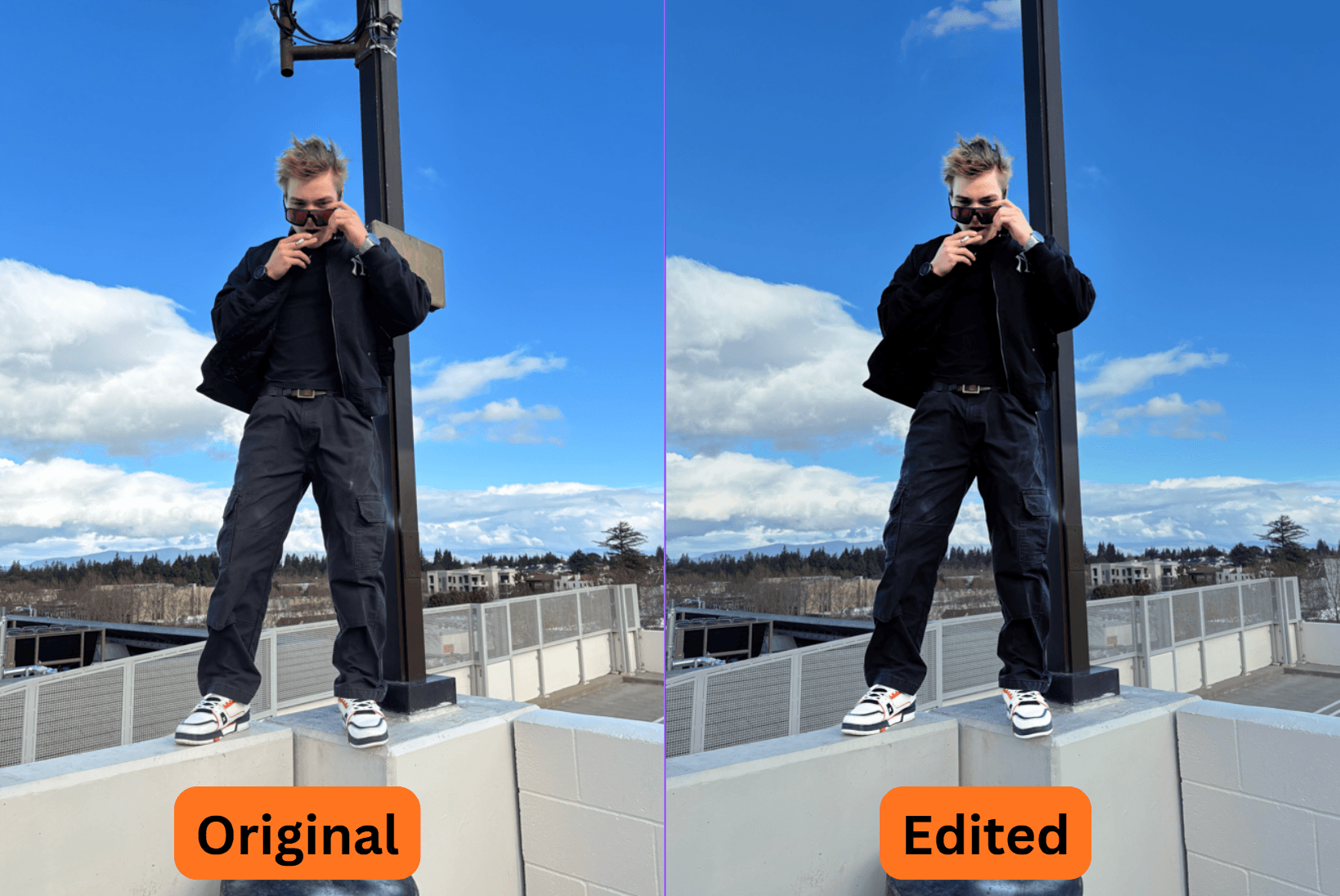
tbh we didn’t even plan this shit AT ALL. we just decided to chill on the rooftop of a parking garage, and i randomly hopped on this wall for fun. great timing that i had my new fit on too, so i just passed my phone (yes, these were taken on an iPhone) to bro and told him to snap a buncha pics while i posed up 💯
this my favorite photoshoot out of all my shoots and ts shit wasn’t even planned. i literally just hopped on a wall, we locked in for a few minutes, n randomly made a hit.
great timing on tha wind tho. that shit made it way dope
editing process - photoshop effect chain n layer setup
i use a pretty similar effect chain and process for almost all of my posts, ive had photoshop experience before i started modeling, and randomly came up with it when doing my very first post.
DM me on instagram for photoshop coaching or if you want me to edit your flicks 💯 i gotchu.
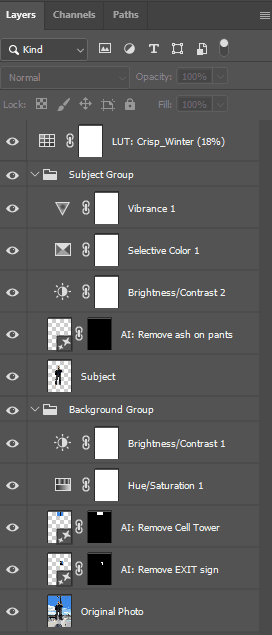
- used ai (Generative Fill) to remove things i dont want (old exit sign and cell tower infrastructure on this pole)
- ai subject selected myself
- but the ai fucks it up and doesnt get it perfect so then i use selection brush to get a perfect selection of myself (important to do this acccuratley as fuck)
- layer via copy - to get subject/myself on a different layer
- dont use layer via cut because it fucks it up for sum reason
- then make two groups for the layers, set them to "normal" (not pass-through, it fucks it up)
- master LUT - i put photoshop's Crisp_Winter LUT on the whole thing at 18% opacity (you can acc change the effect stength of the lut like a filer), gives it this brigther, more saturated, slighly colder look
- background - made it pop less but didn't kill the coloring fully or it'd look weird
- Hue/Saturation 1: saturation -5, lightness -5, small adjustment to make it less saturated/colorful and less bright
- Brightness/Contrast 1: brightness -17, contrast -5
- p much it keeps the background still nice and rich but it won't pop hard or interfere with the subject
- subject - pop hard without fucking it up
- Generative Fill: first an ai correction to get a little bit of ash off my pants
- Brightness/Contrast 2: brightness +12, contrast +12 - base of popping by turning up brightness and contrast, but now my black clothes look way too bright
- Selective Color 1: custom (no preset), relative setting, blacks: +54% black, whites: -20% black - this is the dopest shit that fuckin carried this whole thing. it makes my black clothes much blacker, and my white shoes much whiter. perfect for popping
- Vibrance 1: vibrance +1, saturation +2, micro adjustment to compensate for my face getting a bit too whitened by the selective color effect
- iterate back n forth - i didnt do the subject and background exactly in this order, id do some background edits then some subject edits, going back and forth for the perfect balanced "pop" that i was going for
- note: every layer except master LUT is 100% opacity
song selection
i've wanted to post up with COUNT MY BANDZ for a long ass while, finally did a shoot that fits the song
posting
- export your full-res photoshop project to a jpeg
- make a new photoshop project, 1080x1440
- put the edited full-res jpeg into that new project, scale and position it as needed
- export that 1080x1440 JPEG
- DO NOT USE INSTAGRAM WEB, IT FUCKS UP YOUR QUALITY
- instead, use iCloud or some other way to get those files to your phone. upload off instagram mobile, make sure you have the "upload at highest quality" setting on
promo
this the one thing i can't share publically, there's a way to make posts blow up hella quick through partnerships and marketing (a lot of work before you publish), DM me on instagram if you're interested to work
if you have audiences on multiple platforms, one thing i'd recommend is posting the same pic on every platform with one link back to your main (ex. put a link to your instagram post on tiktok, snapchat, etc)
tldr
didn't plan this shit at all, was out w crew, hopped on photoshop, n randomly made a hit
DM on instagram for photoshop coaching or photo editing